The short version: a free account can make a profile, browse, like a limited number of people and join groups, but it cannot send private messages to anyone you choose. Messaging, and the tools that help you stand out and stay private, are part of Silver Select. There is only one paid plan, so you do not have to choose between levels. We checked the paid privileges on the member site on 15 and 16 September 2026.
Free and Silver Select, side by side
Yes means the feature is included. We do not print prices: the website shows them on a plan screen headed "CHOOSE MEMBERSHIP PLAN" before you pay, in US dollars when a new free account reached it on 17 September 2026. Whether a UK member is ever charged in pounds is to confirm.
| What you can do | Free | Silver Select |
|---|---|---|
| Create a profile, add photos and a voice introduction | Yes | Yes |
| Browse profiles in Flame and Gallery | Yes | Yes |
| Join interest groups and see meet-up listings | Yes | Yes |
| Send private messages to anyone | No | Yes |
| See who liked you and who viewed you | No | Yes |
| Advanced filters and curated daily matches | No | Yes |
| Voice and video calls with your number hidden | No | Yes |
| Browse anonymously and choose who can see you | No | Yes |
| No adverts | No | Yes |
| What you pay | Nothing | Shown before you pay |
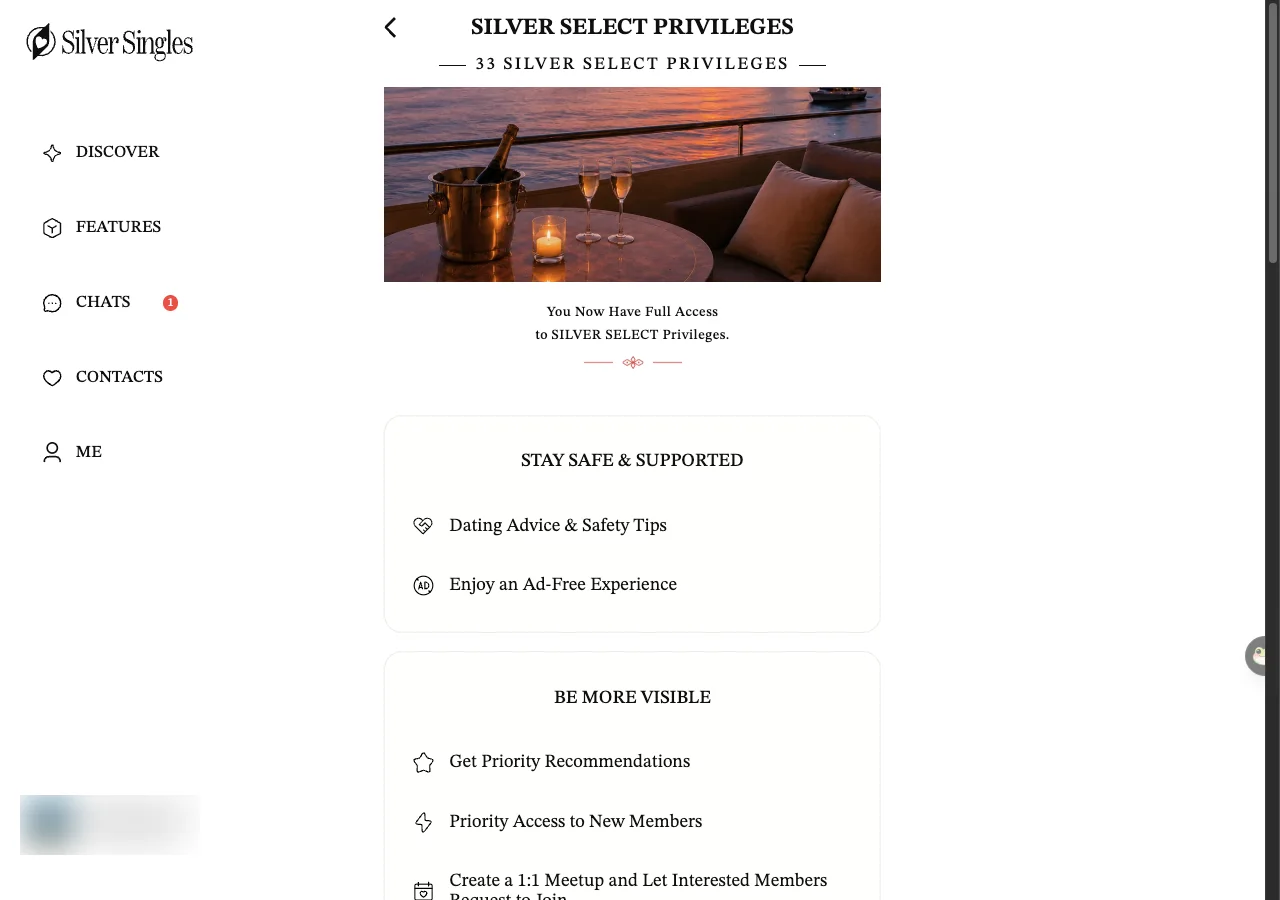
The 33 paid features sit under five headings. The headings and the names in bold follow the site's own list, shortened a little and spelt the British way. Under each one we say what it means when you are using the site. Screen names like Flame and Gallery are explained in our glossary.
Stay safe & supported
- Dating advice & safety tips. A set of the site's own tips on dating and staying safe, shown to paying members.
- Ad-free experience. No adverts anywhere on the site, so the screen stays clear while you browse.
Be more visible
- Priority recommendations. The site says your profile gets priority in its recommendations. It does not say how that priority is worked out.
- Priority access to new members. Members who have just joined are shown to you first, the site says. Exactly how is not spelt out.
- Create a 1:1 meetup. You can host your own meet-up, set a place and time, and let interested members ask to join.
- See who likes you. The full list of members who have liked your profile opens up, rather than leaving you to guess.
- See who viewed you. You can see which members have looked at your profile, so you know who to reply to first.
- Advanced Discover filters. Extra filters beyond age, gender and location let you narrow the search more tightly.
- Curated daily matches. The site picks a batch of profiles for you each day.
- Reconnect with expired matches. A match that has lapsed can be brought back so you can pick the conversation up again.
- Unlimited profile rewinds. If you pass someone by mistake in Flame, you can go back to their card as often as you need.
Optimise your connections
- Private messages to anyone. You can start a private message with any member, which is the main thing a free account cannot do.
- Unlimited swipes & likes. There is no cap on how many profiles you can pass or like in Flame.
- Personalised greeting cards. You pick a card design, add your own greeting and send it instead of a plain message.
- Video & voice chat with number masking. You can call a member by voice or video through the site, and they never see your phone number.
- Voice messages. A short spoken message can go instead of a typed one.
- View-once photos. A photo sent this way disappears after it has been opened once, which limits how far it spreads.
- Prevent incoming calls. You can stop other members from starting a call with you, so you decide when a call happens.
- Unlimited winks. There is no cap on winks, a wink being a quick nudge that says you are interested.
- Customised winks. A wink can carry your own choice of style rather than the plain default.
- Search messages. You can search inside your chats to find an old message without scrolling back through everything.
Stand out more
- Silver Select badge. A badge on your profile marks you as a paying member.
- Pin chats to the top. Your most important conversations stay at the top of your chat list.
- More exposure. Your profile is shown to more members than a free profile would be.
- Custom chat wallpaper. The background of a chat can be changed to a look you prefer.
- Unlimited custom photo albums. You can make as many separate photo albums as you want, rather than keeping every photo in one place.
- Exclusive emojis. A set of emojis only paying members can use appears in your chats.
- Animated winks. Your winks can move rather than sit still, which makes them stand out a little more.
Take control
- Hide certain profiles from search. You can stop particular members from turning up in your searches, and the site keeps the list under Settings, Hidden Members.
- Browse profiles anonymously. You can look at profiles without the other member seeing that you viewed them.
- Choose who sees you. You can limit who is able to see your profile rather than showing it to everyone.
- Change username. The name shown on your profile can be changed after you have signed up.
- On-demand invisibility. You can switch yourself invisible when you want a break from being seen, then switch back.
Which should you start with?
Start with the free account. It costs nothing. Follow the three free steps on only see UK members first, including switching Global Visibility off. You will then see who is on the site in the UK before you decide anything. You can build your profile, add photos, like a limited number of people and see whether there are members you would want to talk to.
Move to Silver Select when you have found people worth messaging. The single most useful thing it adds is private messages, because without them you can like someone but cannot write to them. The calling tools and the privacy controls, like browsing anonymously and choosing who sees you, matter more to some people than others.
Before you pay, know two things. Auto-renewal is on by default, so a plan renews for the same length as the plan you first bought unless you switch it off, and the service agreement allows a refund only within three working days of subscribing. The steps to turn renewal off are on cancel auto-renewal. The figures themselves are not on this site. The website shows its plans on a screen headed "CHOOSE MEMBERSHIP PLAN" before you pay, and a free account can open it, so look at the figure on your own screen and be sure which channel you are buying through. What SilverSingles costs shows the way to that screen and what to check on it. If you only ever plan to browse, the free account is all you need, and there is no reason to upgrade.
For the wider picture of how the site works, from the sign-up screen to your first message, see how SilverSingles works. To decide whether it is trustworthy, see staying safe.
Last updated 18 September 2026.