Three settings narrow SilverSingles to the UK, and all three are free: set Country to United Kingdom in Edit My Profile, make sure Enable Global Visibility is switched off under Me, Settings, Privacy & Visibility, and set Gallery Filters to Living in United Kingdom. None of them needs Silver Select, the paid membership. If the problem is people too far away inside the UK, rather than abroad, be warned that the filters have no postcode box and no mile radius. On a free account the closest you can set is a country and a region, and the Nearest first sort needs Silver Select. Do them the day you join, or today if you already have an account, and before you decide whether to pay for anything. The screens below are from 16 September 2026.
The three settings
- Country in Edit My Profile. Open Me, then Edit My Profile. Under My Basics are fields called Country, State / Province and City. Set Country to United Kingdom, then your region and town. This is the country the site treats as yours.
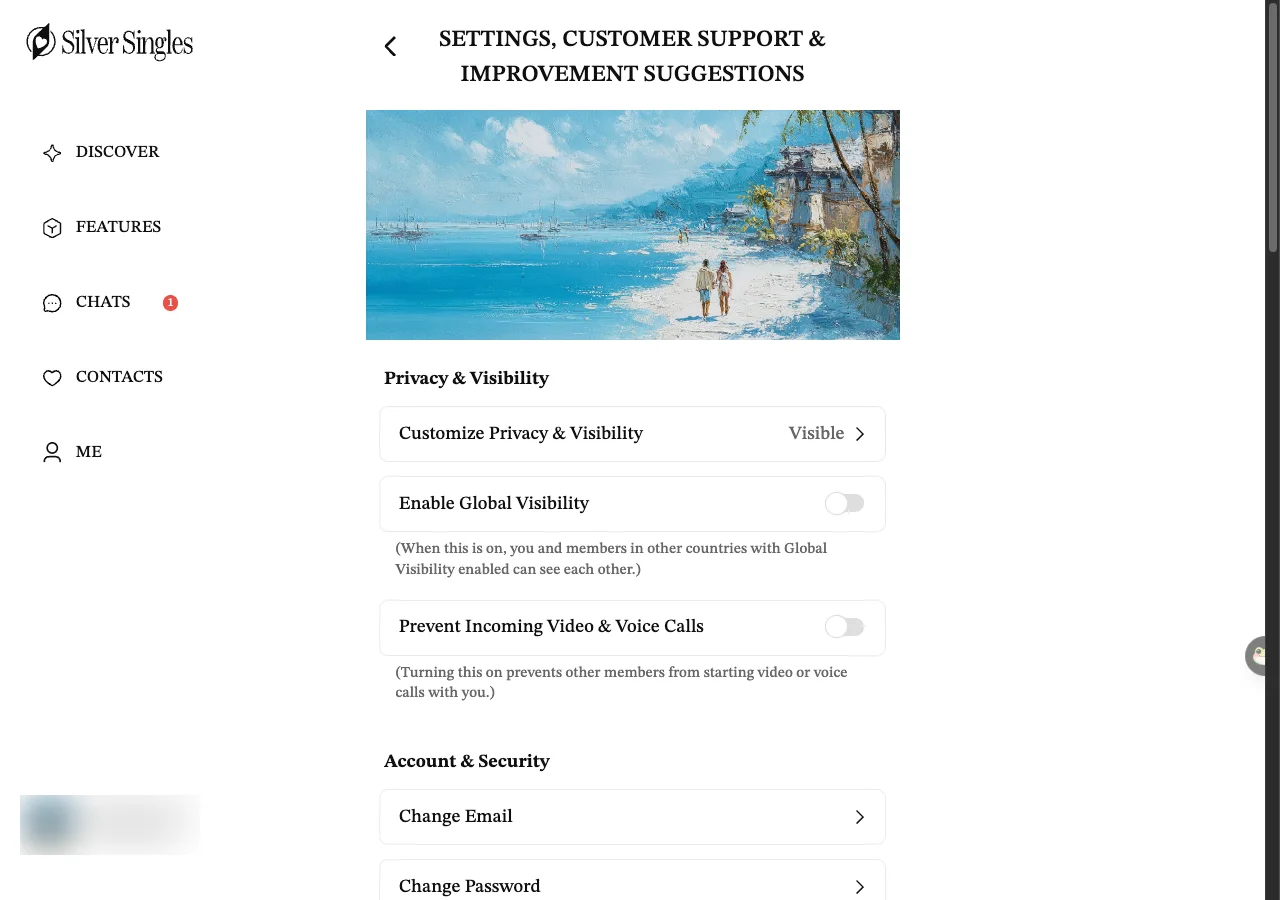
- Global Visibility. Open Me, then Settings, then Privacy & Visibility. Find Enable Global Visibility and make sure it is off. The site's own note under the switch reads: (When this is on, you and members in other countries with Global Visibility enabled can see each other.)
- Gallery Filters. On Discover, press the sliders icon at the top right and choose Gallery Filters. On the Basics tab, under Location, choose Living in, set Country to United Kingdom, and press Apply.
What each one does, and does not do
Country on your profile
This is your address as far as the site is concerned. On the account we check with, which is set to the United States, the fields read Country United States, State / Province New York and City New York, with a separate line called Current Location that read USA on 15 September 2026. Changing Country does not, on its own, hide members abroad from you. It tells the site, and other members, where you are. Whether Global Visibility and another member’s Living in filter read this Country line or the Current Location line is to confirm. So set Country to United Kingdom, then check that Current Location agrees.
Global Visibility
The site’s own note under the switch says it plainly. With it on, you and members in other countries who also have it on can see each other. Switch it off and it works both ways: you stop seeing them and they stop seeing you. Which profile line the site uses as your own country is to confirm (see Country on your profile above), so treat the two settings as a pair and set both. Enable Global Visibility was switched off on our account in every screenshot we took on 15 and 16 September 2026, and what a brand-new account gets is to confirm. Check it yourself when you join rather than assuming either way. Nothing on this screen sorts anyone by distance. For that, see Gallery Filters below.
Gallery Filters
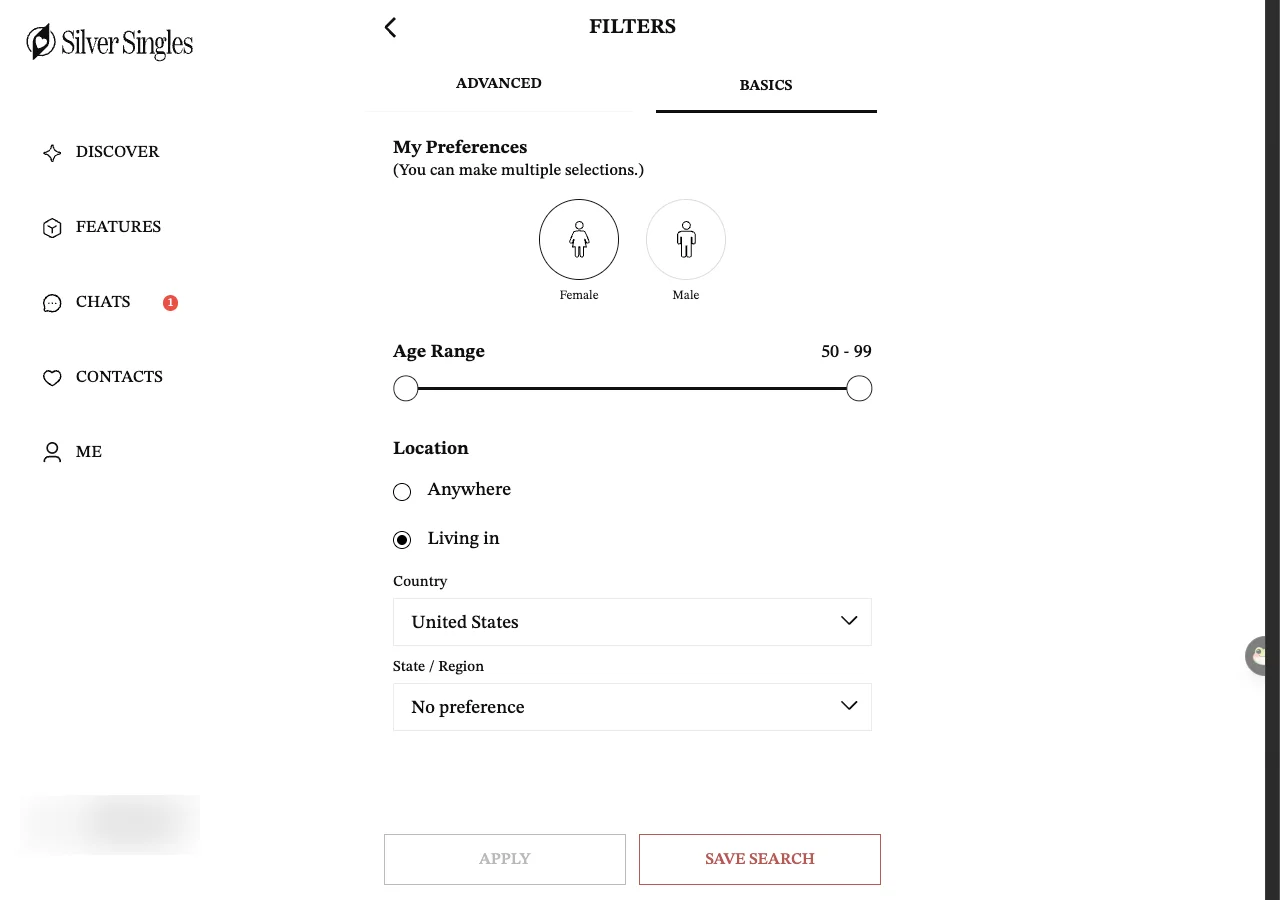
Gallery Filters opens on the Basics tab. At the top is My Preferences, with Female and Male buttons and a note that you can pick more than one. Then an Age Range slider from 50 to 99. Then Location, with two choices: Anywhere, or Living in. Choose Living in and two drop-down lists appear, Country and State / Region. At the bottom are Apply and Save Search buttons. That is the whole tab. On our account it opened on Living in United States, which fits the profile Country above. One caution: our account is set to the United States, so whether a profile set to United Kingdom opens on Living in United Kingdom is to confirm.
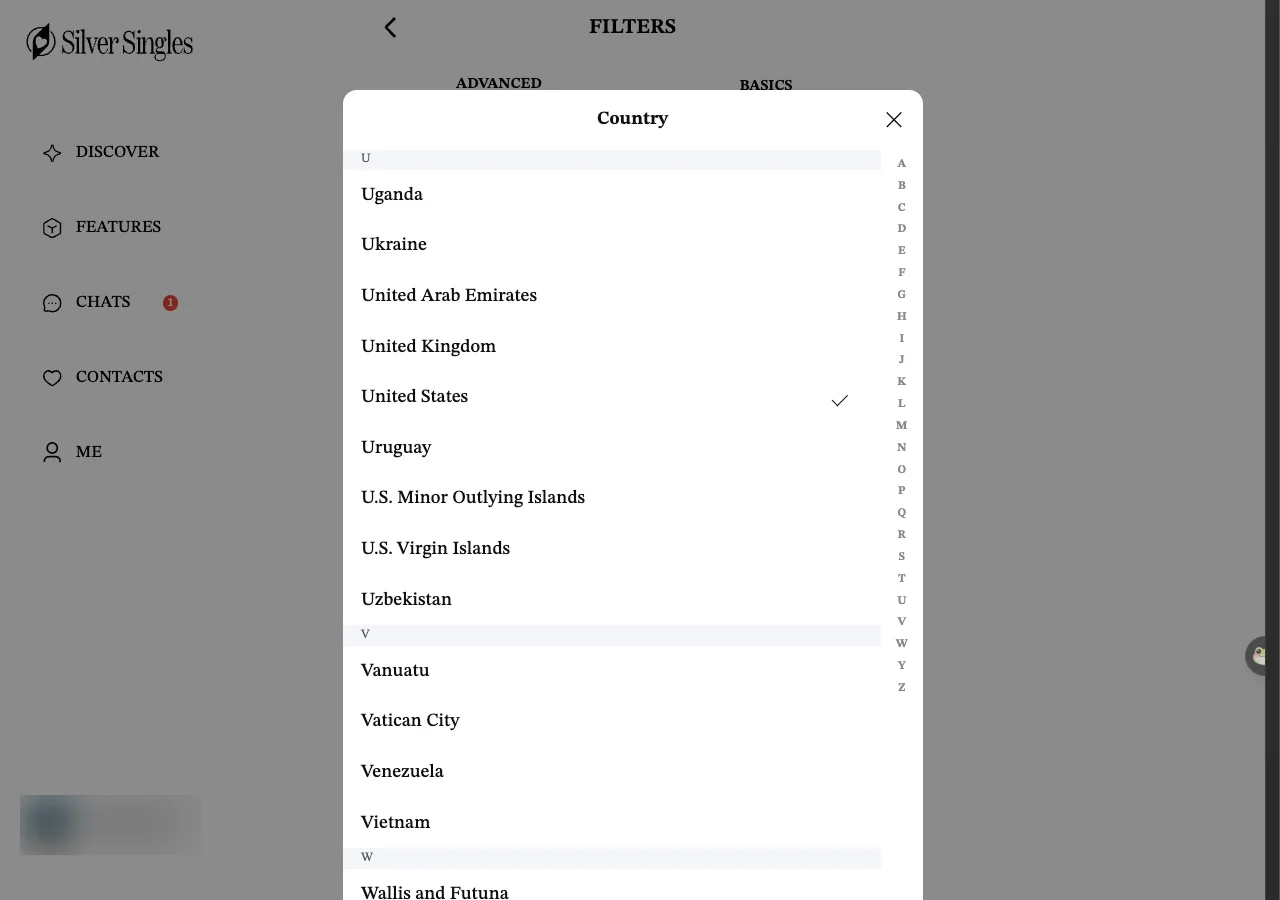
The Country list is alphabetical, with a letter index down the right-hand side, and United Kingdom sits between United Arab Emirates and United States. We did not press it, so which UK regions the State / Region list offers is to confirm. It costs nothing to look: choose United Kingdom, open State / Region, and see whether your part of the country is listed.
What distance the site can filter on
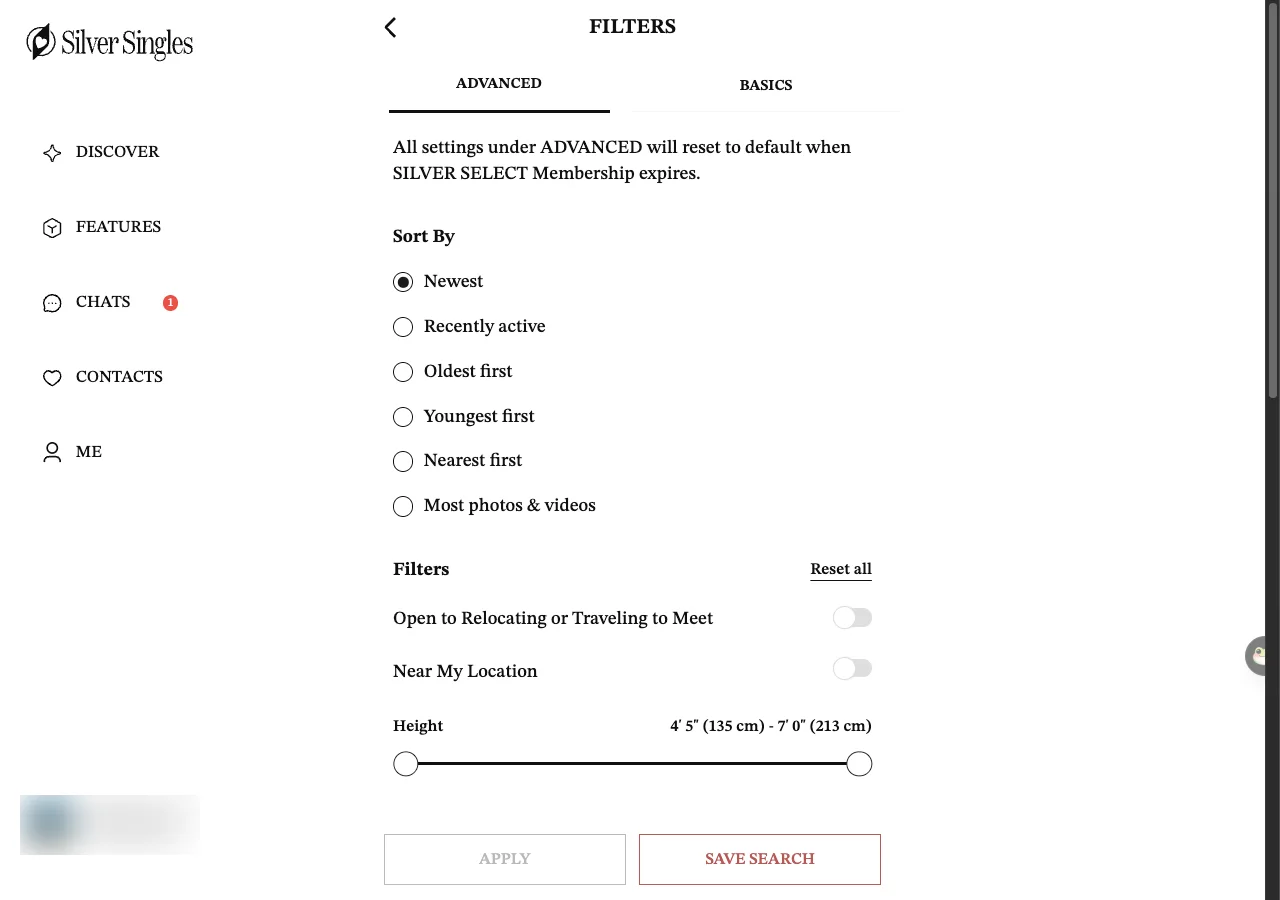
Less than you might expect, because neither tab of Gallery Filters has a postcode box or a mile radius. Location is a country plus a State / Region, and that is it. The Advanced tab adds two things that touch distance: a switch called Near My Location, and a sort called Nearest first among the six sort orders, which are Newest, Recently active, Oldest first, Youngest first, Nearest first and Most photos & videos. What Near My Location measures, and whether it uses your profile town or your device, is to confirm. The Advanced tab needs Silver Select, and its own warning at the top reads: All settings under ADVANCED will reset to default when SILVER SELECT Membership expires. So on a free account, the finest distance you can set is a country and a region.
Flame, the one-card-at-a-time screen, has its own Filters panel with the same Location choice, Anywhere or Living in. Flame Filters has an Enable expanded search switch, with the note: "Once you've swiped through all matching members, well automatically expand your search to find more potential matches." Leave that switch off if you want to stay in the UK. One more thing the filters cannot do is pick out people who have a photo. Gallery Filters, on both the Basics and Advanced tabs, and Flame Filters offer no “with photo” option. The nearest thing is the Advanced sort called Most photos & videos. See why some profiles have no photo for what a blank card means.
Why the people you see may not be near you
Gallery’s sort was set to Newest on our account, so whoever joined most recently sits at the top of whatever the Location filter lets through. With Living in set to United Kingdom that ought to be the newest UK members. We did not set it, so that is to confirm.
A 1:1 Meetup is an invitation from a host to meet one person. On 15 September 2026, the 1:1 Meetup list showed ten hosts: eight in the United States, one in Germany and one in England whose meet-up had already ended. The five still open to join were all in the United States or Germany. So the meet-up side of the site, at least on that day, was mostly American.
The support phone line is a Canadian number, 1-416-628-1072, open 9am to 5pm Eastern Time, which is 2pm to 10pm UK time. The site has been run by SuccessfulMatch.com, Inc. since May 2026. None of that changes who you see. It only tells you who runs the site and where the support line answers from.
We cannot tell you how many members are in the UK compared with anywhere else. We found no published figure, and we did not count. The settings above are the only controls you have, and they are free.
Fewer people will show, and that is the point
The site itself tells you when you have reached the end of the list. When the Flame deck runs out the screen reads: "Want more matches? Expand your filters, message your Likes, or explore Gallery for new connections." with buttons Expand Filters and Message Your Likes. We saw that on 16 September 2026. Expanding the filters would undo what you have just set, so ignore that message. A shorter list of people within reach is the aim.
Last updated 16 September 2026.