Log in at www.silversingles.com/login with the email and password you used to register, or sign in through the app. The old UK address has closed, so a UK member now signs in at the main site like everyone else. If you cannot get in, it is usually one of three things: an account from before May 2026, which the current site may not recognise, a forgotten password, or the wrong app.
Where to log in
There are two ways in, and both use the same email and password.
- On a computer. Go to www.silversingles.com/login, fill in the Email Address and Password boxes, and select Continue. There is also a Keep Me Logged In tick box, with a note under it that reads "Don't check this box if you're on a public or shared device."
- On a phone or tablet. Open the app and sign in there. On an iPhone the app is called SilverSingles®: 50+ Dating. On Android, search Google Play for SilverSingles. The current app is the one published 19 May 2026. You can also sign in on the website in your phone's browser if you would rather not install anything.
Email Address
Password
Link: Forgot Password
Tick box: Keep Me Logged In. Don't check this box if you're on a public or shared device.
Button: Continue
Also: Sign in with Apple / Sign in with Google / Sign in with Mobile Number
The login page also offers Sign in with Apple, Sign in with Google and Sign in with Mobile Number. Use whichever you set up when you joined. If you registered with an email address, use that route.
I had an account on silversingles.co.uk
Whether an account from the old silversingles.co.uk site still works on the current site is to confirm. The service changed hands in May 2026, the old UK address was closed, and SuccessfulMatch.com, Inc. now runs the site. We have found no statement from either company about old logins.
We want to be plain about this, because it is the thing people find hardest to believe. We have found nothing that says old profiles, photos or matches were moved across, and nothing that offers to bring an old account back. If your old email and password are not accepted, that is the likely reason, and it is not a mistake you have made.
If your old details are not accepted, register again from scratch. Making an account and looking around is free. You will start with an empty profile and no matches until people find you. The background to the change is on what changed at SilverSingles in 2026, and what the paid tier adds is on free versus Silver Select.
Forgotten password
If your account still exists but the password will not work, reset it from the login page.
- Go to www.silversingles.com/login and select Forgot Password, just under the password box.
- The page that opens says "Enter your account's email and we will send you an email with instructions." Type the email address on your account and select RESET PASSWORD.
- The site then sends an email to that address. Open that email and follow the instructions in it.
- If the email does not arrive within a few minutes, check your spam or junk folder before trying again.
If you cannot remember which email you used, or you no longer have access to it, the Forgot Password page has a Forgot Email Address link. Use that, because the reset always goes to the email on file.
The app says my account doesn't exist
The Android app changed when the service changed hands. The current listing is a new one, com.silversingles.dating, published 19 May 2026, so an Android app installed before that date is a different one and needs replacing. On an iPhone the app is SilverSingles®: 50+ Dating. If your iPhone app dates from before May 2026, whether it still signs in to the current site is to confirm.
On Android, delete the old app and install the Google Play listing published 19 May 2026. On an iPhone, check that the app on your phone is SilverSingles®: 50+ Dating. If it has a different name, install that one from the App Store. Once the current app is installed, sign in with your current details, or register if your account was from before May 2026. If a brand-new install still says your account does not exist, the account itself is the problem rather than the app, so read the section above about old silversingles.co.uk accounts. Which app is which, what the store pages say about each, and why we suggest registering on the website before installing either, is on the SilverSingles app: iPhone, Android and the web.
Two-factor authentication
The site has an optional extra lock on your account called two-factor authentication. It sits under Me, then Settings, in the Account & Security section. On our account it was switched off.
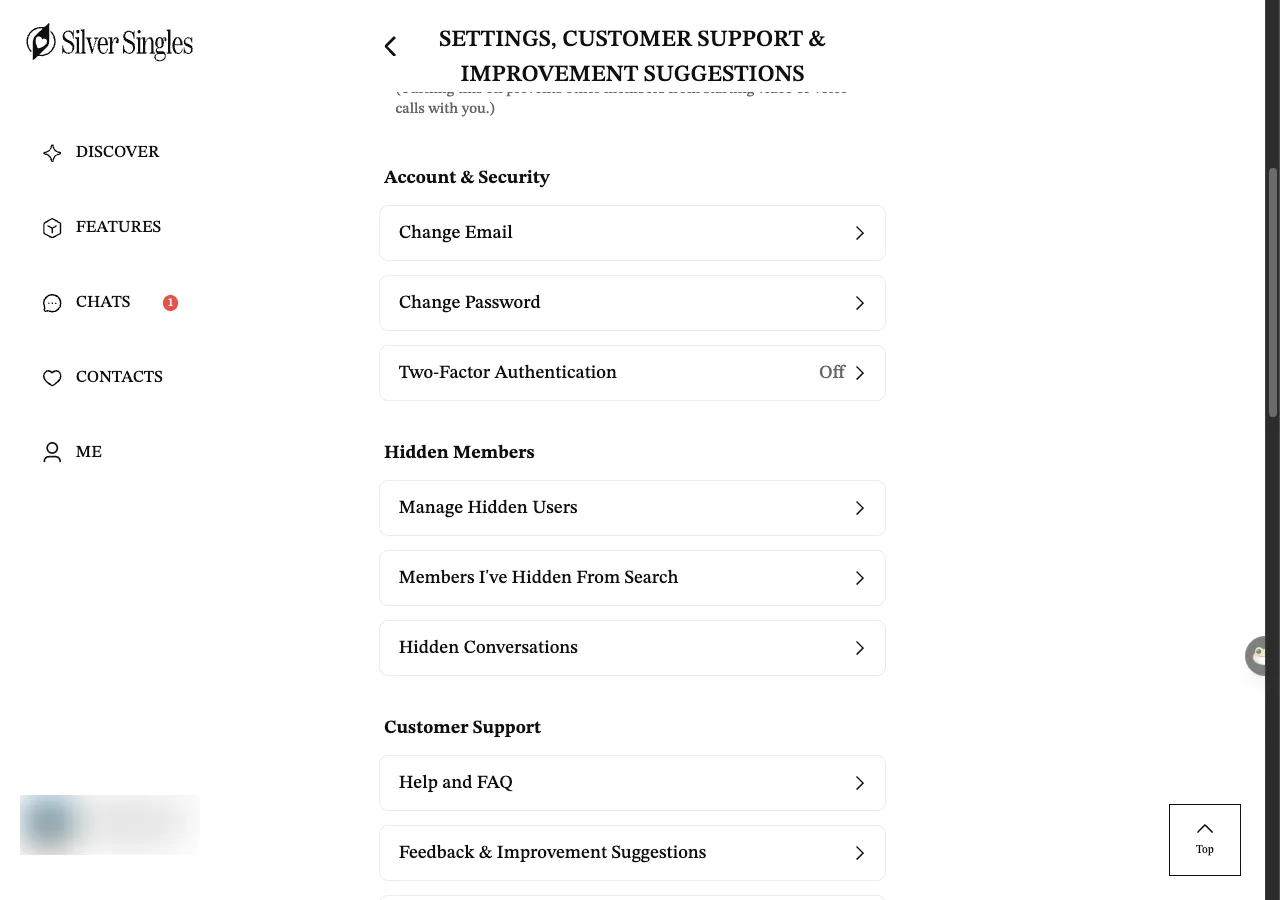
When it is on, signing in takes an extra step. After your email and password, the site asks for a one-time code as well, and you are only let in once that matches. We did not switch it on ourselves, so we have not been through that step, and what it looks like is to confirm. Separately, on the sign-in page as served on 16 September 2026, a Verify Your Account step offers Text Me or Email Me and then asks for a 6-digit code. Whether that is the two-factor check or a different verification is to confirm. If you turn two-factor on, keep your phone to hand when you sign in on a new device.
Still stuck?
If none of the above gets you in, the site's own support team is the next step, because they can see your account and we cannot.
From the UK, email is the sensible route, because the phone line only opens at 2pm our time and both numbers sit abroad. Say what you have already tried, so they do not send you back through the same steps. We are not SilverSingles and cannot see or open your account, so please write to the address above rather than to us for anything to do with signing in. If you are weighing up whether it is worth getting back in at all, our page on whether SilverSingles is legit sets out what we could and could not check.
Last updated 16 September 2026.