You pay nothing for a free account, and Silver Select is the only paid tier. Its price is not on this page. It is on a screen inside the member site headed "CHOOSE MEMBERSHIP PLAN", which a free account can open without paying, and on 18 September 2026 that screen priced its plans in US dollars. Whatever the figure is on the day you look, the setting that matters most is auto-renewal, which is on by default.
Is SilverSingles free?
Yes, to a point. Making an account, filling in a profile and looking at other members costs nothing, and nobody takes a card number to let you do it. This is what a free account can do:
- Create a profile, add photos and a voice introduction. You build the profile, add photos and record a short voice introduction, all without paying.
- Browse profiles in Flame and Gallery. Flame shows you one member at a time to swipe through. Gallery shows many at once. Both are open to a free account.
- Join interest groups and see meet-up listings. The interest groups are marked free to join, and you can read the meet-up listings without paying. Creating a meet-up of your own is a Silver Select privilege.
What a free account cannot do is the part people trip over. You cannot send a private message to whoever you like, you cannot see who liked you or who viewed you, and you see adverts. Sending the first message is the thing most people join to do, and it sits behind Silver Select. So "free" is real, but it is a look around rather than a way to start a conversation. The full split is on free versus Silver Select.
Where the price is, and how to see it without paying
The price lives on one screen, and you do not have to pay anything to open it. On 18 September 2026 we went there on our own account, and this is the route.
- Register free. The sign-up form asks for no card. The steps are on how it works.
- Pass the face-photo check. A new account is asked for a clear photo of your face at its first log-in, and until that is done the member pages stay shut.
- Press UPGRADE. It is the button at the bottom of the left-hand menu. It opens the screen headed "CHOOSE MEMBERSHIP PLAN", and the prices are on it. Nothing is charged until you pick a plan, press CONTINUE and enter a card.
CHOOSE MEMBERSHIP PLAN
SILVER SELECT PRIVILEGES (33)
Your subscription renews automatically unless cancelled.
CONTINUE
Go and look, then come back here to decide. Opening the screen commits you to nothing. Our own account has been to it more than once without buying.
Why we do not print the figure
Two reasons. The affiliate programme this site belongs to does not allow partner sites to state price amounts, and we would rather keep to that than lose the right to send you there at all. The other is that a figure copied from a screen goes stale. The site can change its prices without telling anyone, so the number that counts is the one in front of you on the day you pay, not one we wrote down earlier. Everything else about the price, we can tell you.
What to look at on that screen
The currency. When we opened the screen, on 17 September 2026 and again on 18 September 2026, the plans were priced in US dollars. Your bank converts the amount, and some UK cards add a charge for paying in a foreign currency, so the line on your statement can be a little higher than the figure on the screen. Whether SilverSingles ever shows a UK member a price in pounds is to confirm.
The plans. There were two: 1 month and 3 months. The 3 months plan carried the site's own "MOST POPULAR" label, and each month of it costs less than buying a month at a time, which is the usual shape. The 1 month plan is marked "billed every month", which means it keeps billing until you stop it. If you are testing the water, the shorter plan is the safer buy even though each month costs more.
The renewal line. Under the plans the screen says, in its own words: "Your subscription renews automatically every 3 months unless canceled. Cancel anytime in Account Settings > Subscription or through Contact Us." Note the path it gives, Account Settings then Subscription. The page we found the switch on is a different one, and both are listed in the next section.
The name on your statement. The screen tells you that the charge will appear on your card statement as Success*SSG. Write that down. It is the name to look for when you check your bank, and the name to give your bank if a charge needs disputing.
Which channel you are buying through. The website and the phone apps do not charge the same amounts for the same membership, because the apps bill through Apple or Google rather than through the site. Before you pay, be clear whether you are on silversingles.com in a browser or inside the app. The App Store listing and the Google Play listing both say the app has in-app purchases, and when we read them on 18 September 2026 neither listed a price. If you buy inside an app, the price you see there is Apple's or Google's, and so is the cancellation.
Auto-renewal and refunds: what to know before you pay
Auto-renewal is on by default, so a subscription renews for the same length unless you switch it off. A three-month plan renews for another three months. It is the thing most likely to catch you out, and it has a plain fix inside the account.
Turn it off the day you subscribe. It does not shorten what you have paid for. The membership runs to its expiry date as normal, and then it simply stops instead of billing you again. The page we found is Me, then Settings, then Payment, then Payment Details, then Renewal Status. The plan screen itself names Account Settings then Subscription, and says you can also cancel through Contact Us. Whichever you find first, the page looks like this.
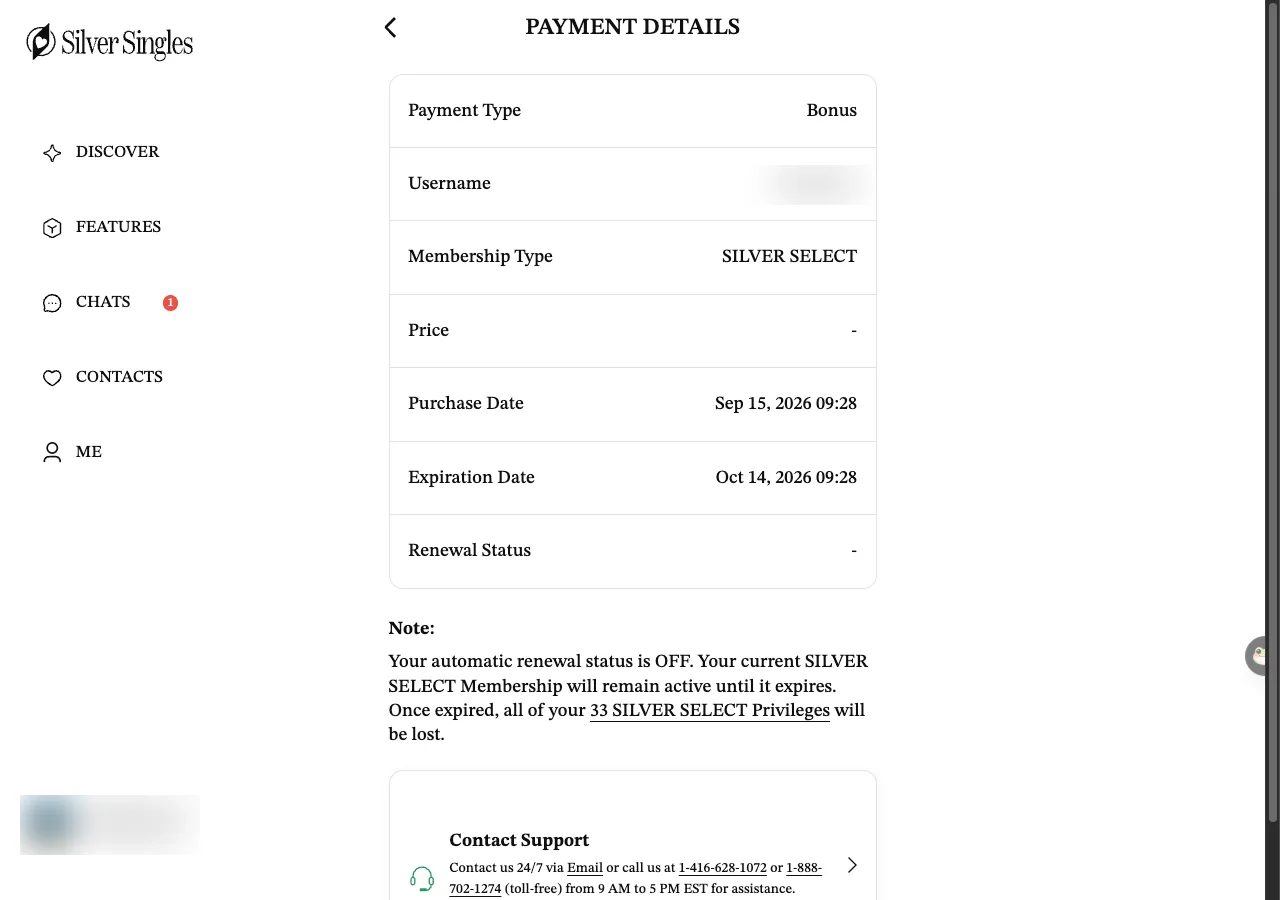
Renewal Status is the line to watch. On our account it showed a dash, and the note underneath said automatic renewal was off and the membership would stay active until it expired. That is the state you want if you are trying a month and do not want to be charged again. What you press to switch it off, on an account where renewal is still on, is to confirm, because our membership was a complimentary one and had nothing to switch. If the page does not make it plain, the Contact Support box under the table is the place to ask.
The other rule to hold in your head is the refund window. The service agreement allows a refund within three working days of subscribing. After that there is no refund, so read the plan length before you pay and do not buy the long plan to test the water. If you want the steps with the screens, they are on cancel auto-renewal.
Old prices you will see elsewhere
Search for the price and you will find plenty of pages happy to quote one. Most of them are describing the service as it was before May 2026, when a different company ran it with a different set of plans, and some are guessing. None of them can see the screen in front of you. Treat any figure you read on another site as a rumour, and treat the plan screen as the fact.
What you get for the money
Silver Select carries 33 listed privileges. Most people are paying for one of them: the ability to send a private message to anyone, rather than waiting to be messaged. The rest are useful extras rather than the reason to pay.
The ones worth knowing about are seeing who liked you and who viewed you, voice and video calls that run through the site so your phone number stays hidden, advanced filters and curated daily matches (matches the site picks for you each day), browsing without leaving a trace, and an advert-free screen. If none of those matter to you and you only want to read profiles, you do not need to pay at all. The full list, set against the free account line by line, is on free versus Silver Select.
Is it worth it?
It depends on one thing: whether you are going to message people.
It is worth paying if you have looked around on a free account, you can see members you would like to talk to, and you are ready to start conversations. Messaging is the whole point of the paid tier, and a month of it is a fair test of whether the site works for you. Buy the shortest plan first, turn renewal off the same day, and see what a month brings.
Skip it if you only want to browse, if you have not yet checked who is near you, or if you are hoping the paid tier will fill a thin local membership. It will not. Paying does not add members to your area. If the free account shows you very few people you would want to meet, a subscription buys you the ability to message a small pool, which is rarely money well spent. The honest move there is to wait, or to decide the site is not for your area. We set out what we could and could not confirm about the service on is SilverSingles legit.
If you want to look before you decide, the free account is the place to start. Join SilverSingles free, build a profile, see who is near you, and only pay once you know there are people you want to message.
Ways to get Silver Select without paying
The site lists two reward schemes under its settings, and the first can lead to a month of membership without a card. Neither is a reliable way to get a free subscription, and we would not join expecting either to come off, but they are real and they are worth knowing about. Both sit under Me, then Settings, then Customer Support.
- Feedback & Improvement Suggestions. The menu line under it reads "Get a 1-Month SILVER SELECT Membership Reward". It opens a form for suggesting how the site could be better, and the page adds: "While we may not be able to use every suggestion, we carefully review and consider each one." So this is a possibility, not a plan. Send a genuine idea if you have one, and if a free month comes of it, treat it as a bonus.
- Security Reward Program. This is the next entry in the same menu. What its page offers, and who qualifies, is to confirm. Going by the name it is for people who report security faults in the site, not a route to a free membership for an ordinary member. We mention it only so the list is complete.
Beyond those two, be wary of anything else that promises free Silver Select. Coupon and voucher pages for dating sites are often out of date, and some exist only to get hold of your card details. We have not seen a real discount, and we would only trust one shown on the site's own plan screen or in its own app listing.
If you would rather see how the whole thing works before you weigh up a subscription, start with how it works, or read the short version of everything on SilverSingles UK.
Questions people ask
Is SilverSingles free to use?
How much is Silver Select?
Can I see the price before I pay?
Can I get a refund?
Will it charge me again after my first month?
Last updated 18 September 2026.