The short version: never send money to someone you have only met online, and you have removed most of the risk. The rest of this page is detail about the site, about the people who misuse dating sites, and about the UK services that can help if things go wrong. We walked through the member site on 15 September 2026 and opened every UK link on this page the next day, in a browser.
Before you upload a photo
Anyone who looks at your profile can copy your photo. Choose it with that in mind.
- Use a photo taken for the site. A picture that is already on Facebook or a club website can be dropped into a reverse image search, a free tool that looks for other places the same photo appears. That search can lead straight to your surname and your town. A photo nobody has seen before cannot be traced that way.
- Check the background. A house number, a car registration plate or a work lanyard tells a stranger more than you meant to share. Crop it out.
- Leave grandchildren out of it. They did not agree to be on a dating site, and a child's face in the picture makes you easier to trace.
- Keep your surname, address, workplace and phone number off the profile. Keep them out of the first messages too, until you feel comfortable.
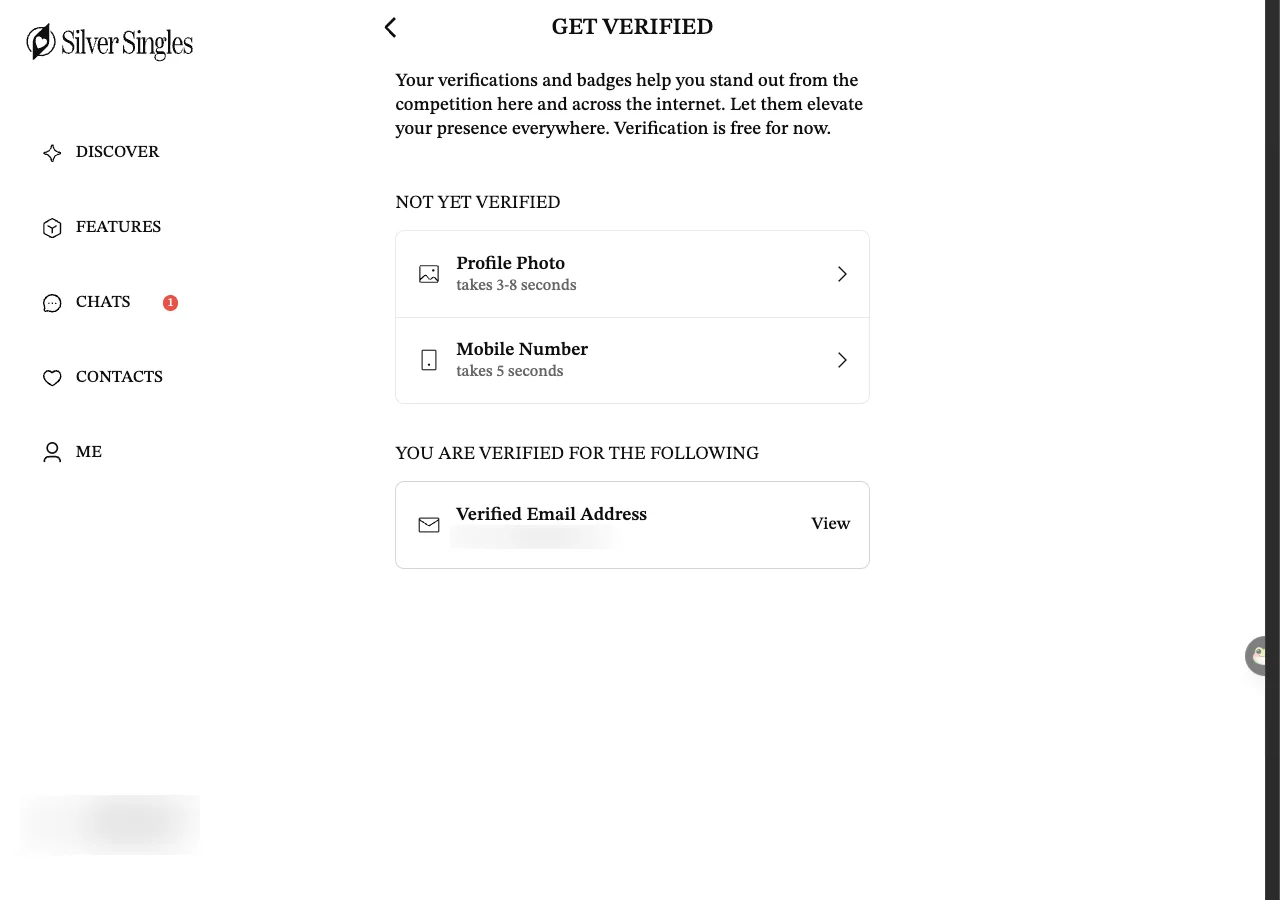
- Get verified, then look for the badge on others. On the member site, Me, then Get Verified and Stand Out, offers a photo check (3 to 8 seconds), a mobile number check (about 5 seconds) and an email link. It is free for now. The badge tells other members that the person passed at least one of those three checks. Which one earns it is to confirm. A profile without one is not a fake. A person who still will not get one after weeks of chatting is worth a second thought.
Signs of a romance scam
A romance scam is slow. Weeks of warm, attentive messages come first, and the request for money comes later, once refusing would feel unkind. The police fraud reporting service at reportfraud.police.uk, which many people still know as Action Fraud, says that for almost a third of the people targeted the fraud runs for more than a year. The pattern is the same whichever site it starts on, and it has a handful of tells.
- They ask for money, or for something money-shaped. A customs fee, a plane ticket, vouchers, cryptocurrency, an investment tip, a loan until pay day. Report Fraud's advice on romance fraud is blunt: never send money, however sad or urgent the story, and report anyone who asks to the dating service.
- They want you off the site fast. They offer WhatsApp, email or a phone number in the first message or two. While the conversation stays on SilverSingles, you can report the member to the site. Once it has moved to WhatsApp, the site can no longer see what is said. That is usually the reason for the hurry.
- They never appear on a video call. The camera is broken, or the signal is poor, or they are shy. If you have Silver Select you can offer a video call through the site with your number hidden. Someone who has a fresh excuse every single time you suggest one is telling you something.
- The story involves a job overseas. An oil rig, a military posting, a surgeon with a charity abroad, an engineer on a contract. The job does two things at once: it explains why you cannot meet, and it sets up the emergency that will need your money.
- Too much, too soon. "My love" in the first week, talk of a future together, and a request to keep the relationship private. Report Fraud says to be wary of anyone who asks you not to tell others about them. A fraudster wants your friends and family kept out because they would spot the pattern.
If you recognise two or more of these, stop replying, take screenshots of the messages and report them from their profile. Then tell someone you trust what happened, even if you feel foolish. The embarrassment is deliberate on the fraudster's part, and nobody who reads those messages will blame you.
What SilverSingles does and doesn't check
It helps to know exactly what the site stands behind.
The service is for people aged 50 and over. How the site checks a member's age is to confirm, and the minimum age says nothing about anyone's honesty.
Photo, phone and email checks exist and are free for now. Our own account showed "not yet verified" for photo and phone, and it worked as normal. A new account we made on 17 September 2026 was asked for a clear photo of the member's face at its first log-in, and it could not reach any member page until one was uploaded. So some members have passed a check and some have not, and a badge is not a hurdle everyone has cleared.
SilverSingles states it does not conduct background checks on members. A sentence to that effect is in the footer of its public site. "Verified" on a profile means the member passed one of the site's own checks, a photo, a mobile number or an email address. Nobody has looked at a criminal record.
The site's own safety tips page is under Me, then Settings, then Online Dating General Safety Tips. The emergency number and the support organisations it lists are American. It gives 911 where a UK page would say 999. That gap is why the UK section further down this page exists.
Support is by email at support@silversingles.com. The member site says email support is available around the clock. The phone number is Canadian, 1-416-628-1072, staffed 9am to 5pm Eastern Time, which is 2pm to 10pm UK time. From the UK, email is the sensible route.
Use the site's own tools
The member site has more safety controls than most people find. Four of them are not listed as paid privileges. The other five need Silver Select. This is where each one lives.
- Report and hide. The site's FAQ says you can report the member from their profile or your conversation with them. To hide someone, it says, you click the ellipsis (three dots) on the user's profile, and click on "Hide". Whether a free account sees both options in every place is to confirm. We checked with a Silver Select account. If you are on a free account and cannot find them, email support.
- Hidden members. Settings has a Hidden Members section with Manage Hidden Users, Members I've Hidden From Search and Hidden Conversations. Hiding a profile from your searches is listed as a Silver Select privilege.
- Calls with your number hidden. Voice and video calls run through the site, so the other person never sees your phone number. This is Silver Select only. It lets you hear a voice and see a face before you meet.
- Prevent incoming calls. A switch on the settings page stops other members from starting a call with you. It is listed as a Silver Select privilege. Turn it on if you would rather be the one who decides when to call.
- View-once photos. The name says a photo sent this way can be opened once. It is Silver Select only. We have not sent one, so exactly what the other person sees afterwards, and whether a screenshot is possible, is to confirm.
- Browse anonymously and choose who sees you. Both are Silver Select privileges under Take Control. One lets you look without leaving a trail. The other keeps your profile out of some people's view.
- UK only. Me, then Settings, then Privacy & Visibility, then Global Visibility (switch off). With Global Visibility off, members in other countries stop seeing you and you stop seeing them. It is a plain settings switch. Which profile line it reads is to confirm, and either way it cannot catch someone who has typed the UK into theirs. Treat it as a filter rather than a safeguard, and set the Country on your own profile to United Kingdom as well. Steps, and the two other free settings, on only see UK members.
- Two-factor authentication, meaning a second code as well as your password. Under Me, then Settings, then Account & Security, then Two-Factor Authentication. It was off on our account on 15 September 2026. Turning it on means a stolen password alone cannot open your account.
- Pause or delete. Me, then Settings, then Account Management, then Pause or Delete Account. Pressing it asks for your password before it shows anything. What pausing does, and whether a deletion can be undone, is to confirm.
Most of these are in the paid tier. The page on free versus Silver Select lists all 33 privileges, so you can decide whether the calling and hiding tools on their own are worth a month's subscription to you. If they are, start with the free account and turn auto-renewal off on the day you upgrade.
Meeting in person
By the time you meet, you should already have had a video call. Calls through the site need Silver Select. On the free account, a video call on a service you already use will do, once you have been chatting for a while and it is you who suggests it. If the person on the call did not match the photos, or would not do a call at all, you do not owe them a meeting.
- Daytime, public, somewhere you know. A café, or a walk in a park with other people about. Not anyone's house, and not a hotel.
- Tell someone. Give a friend the person's username, where you are meeting and when you expect to be home, then send a message when you get in.
- Get there and back under your own steam. Drive, take the bus or book your own taxi. Being collected from home hands a stranger your address before you have decided whether you trust them.
- Keep it short. An hour over coffee is enough to know whether you want a second meeting, and it is easy to leave.
- Keep your drink and your bag with you. It is dull advice, and it is still true.
- Leave if it feels wrong. You do not need to explain yourself. Anyone who is offended that you looked after yourself has told you something worth knowing.
If something goes wrong in the UK
If you are in danger now, call 999. Otherwise do these in order: your bank first, then the police, then the site.
- If you have sent money, ring your bank now. Most UK current account providers answer the short number 159, run by Stop Scams UK. It connects you straight to your own bank and cannot be faked, so you never have to trust a number a stranger gave you. Report Fraud's advice is to tell your bank as soon as possible so it can help stop further losses.
- Report it to the police through Report Fraud. reportfraud.police.uk is the national reporting service for England, Wales and Northern Ireland. You can report online or ring 0300 123 2040. If you live in Scotland, or the crime happened there, contact Police Scotland on 101. Report Fraud gives you a reference number after you report, which your bank may ask for.
- Report the profile on the site. Do it from their profile, then email support@silversingles.com with the username and your screenshots. The site says it does not run background checks, so it depends on reports like yours to remove people.
- Take Five. Take Five to Stop Fraud is a UK campaign against fraud. Its three words, Stop, Challenge, Protect, are worth remembering before any request for money or information.
- Age UK. Its scams and fraud pages cover phone, doorstep and postal scams as well as dating, and include a page on how to spot a catfish, meaning someone using a false name and photo. The same site has a link to find your local Age UK if you would rather talk to someone.
One last thing. Report Fraud's own description of romance fraud says victims are manipulated on purpose, over a long time, by people who are practised at it. Being caught by that is not a character flaw, and reporting it helps protect the next person.
If you would like to know how the rest of the site works before you decide, start at SilverSingles UK. There is also a page on whether SilverSingles is legit, where we set out what we could and could not check.
Questions people ask
Is SilverSingles safe for people over 60 in the UK?
Does SilverSingles check members' backgrounds?
Can I stop people outside the UK from seeing my profile?
Someone on the site has asked me for money. What should I do?
Is the verification badge proof that someone is genuine?
Last updated 17 September 2026.